


How to Plan B2B Ecommerce ERP Integration Around Your Sales Process
Which system owns each object, what must sync live, and the failure cases to test at the pilot.
 Yevhenii Sukhov·Publication date·17 min read
A buyer orders at their contract price. The ERP accepts it at list price. The warehouse reserves stock already promised to another account. Three systems hold three versions of one order, and the customer usually finds out first. McKinsey's Global B2B Pulse of 28 May 2026, a survey of close to 4,000 decision-makers in 13 countries, found inconsistent information across teams is now the leading reason buyers switch supplier. This article covers how to map the data flows, pick a connection method and prepare the launch.
The Decisions That Shape the Integration
Each of these is a business decision that the tooling will encode whether or not you make it.
Name the owning system for every object
Price, stock, company record and order status each need one system that decides the value. Everywhere else displays a copy.
Agree the transfer rules before the tooling
Direction, trigger event, acceptable delay and the check that proves it worked, written down per object.
Match the method to your processes
A packaged connector, an integration platform and custom work each cover a different share of B2B behaviour.
Design the failure path first
Retries, duplicates, out-of-order updates and an unreachable ERP decide whether the integration survives month two.
How Does B2B Ecommerce ERP Integration Work?
B2B ecommerce ERP integration is the exchange of agreed data between your online store and your enterprise resource planning system, so a sale recorded in one appears correctly in the other. The store holds the buying experience: catalogues, contract prices, logins, the basket. The ERP holds the commercial truth: stock, costs, credit, invoices, the ledger. Refresh speed per object is a configuration choice tied to the process it serves.
Follow an Order from Checkout to Fulfilment
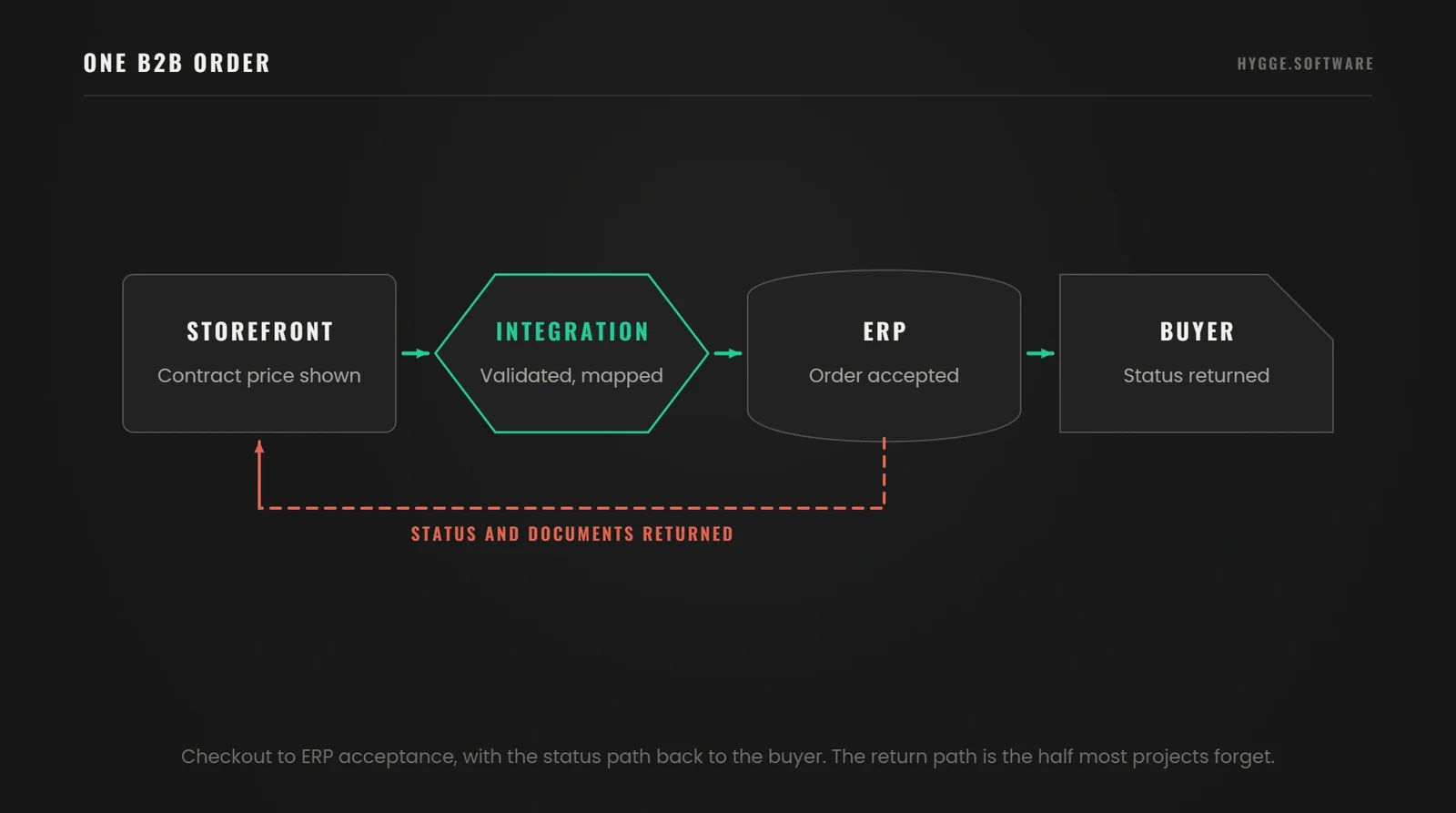
A distributor's buyer signs in, adds 40 units at their contract rate, enters a purchase order number and pays on 30-day terms.
At checkout the store asks the ERP whether that price still applies and whether the quantity is available to promise. The order is created with a store order number and sent on. The ERP creates a sales order, checks the credit limit, accepts or holds it, and returns its own number and a status. The warehouse picks, the ERP posts a shipment and an invoice, and both move back so the buyer sees tracking and a document.
Four identifiers are now linked: store order, ERP sales order, the buyer's purchase order number and the invoice. Every later status update has to find its way back to that chain.
What Makes B2B Integration Different?
Consumer stores sell one catalogue at one price to one person per account. B2B sells a different catalogue at a different price to several people inside one company, some of whom can buy and some of whom can only request.
Shopify models this with three objects apps can read and write: a Company, its Company Locations, and the Company Contacts acting on its behalf, with catalogues, tax exemptions and payment terms attached at location level. That shape matters for ecommerce integration with ERP, because the ERP holds its own hierarchy: a customer account, ship-to addresses, a price agreement, a credit limit. Mapping one onto the other is the first real piece of work, and most launch delays start there. Shopify also documents that its B2B surface excludes purchase options such as subscriptions and pre-orders, a gap worth finding in week one.
Source: Shopify B2B developer documentation, read October 2026.
Define Which Data Moves and Which System Owns It
Teams reach for a connector before agreeing what it should carry, then find the default field map encodes a decision nobody made. For every object, name the owning system, the receiving system, the trigger event, the delay the business accepts, and the check that proves it arrived.
Ownership causes arguments because it sounds technical and is commercial. A price owned by the ERP cannot be edited in the store, so a merchandiser running a promotion works through the ERP. Reverse it and finance loses control of margin. Leaving it open is the failure mode.
The cost of settling it early is visible in our own work. On the PlayFusionLabs CRM we put sales, projects and finance into one database in about two months, and the reason that schedule held is that each record was given one owning system at the data-model stage.
Products, Prices and Available Stock
The following get treated as one object too often: the product description a buyer reads, the contract price for their account, the physical quantity in a warehouse, and the quantity available to promise after reservations and inbound deliveries.
The commercetools guidance puts product data, pricing and inventory in the ERP as the system of record, with the commerce platform reflecting updates it does not initiate. That holds for most distributors, and stops holding once a product information system or a warehouse system owns part of the record, common past a few thousand catalogue lines. The ERP becomes one source among several, and the integration routes per field.
Available to promise is the number that causes oversell. Physical stock is a fact. Available stock is a calculation, and whichever system performs it owns it.
Accounts, Orders, Invoices and Returns
Company records originate in the ERP, where credit and tax status live. Orders originate in the store. Invoices, shipments and credit notes originate in the ERP. Returns are the awkward case: the buyer starts them, the warehouse confirms them, the ERP decides what money moves.
Write down which changes a buyer may initiate and which an internal system confirms. Changing a delivery address on an unpicked order is fine. Changing quantity after the ERP has allocated stock is a different transaction, and the answer is often to cancel and re-create.
Objects, Owners and Checks
A worked example for a distributor selling on contract prices, with the owning system, the trigger, the acceptable delay and the proof for each object.
Product record
ERP or product information system owns it, store receives, on create and change. Hours of delay are fine. Confirmed by comparing record counts and sampled fields on a schedule.
Contract price
ERP owns it, scoped to the company location, re-checked at checkout. Zero delay at purchase. Confirmed by re-pricing the basket before the order is accepted.
Available stock
ERP or warehouse system owns it, pushed on movement in short batches. Minutes for display, zero for the final check. Confirmed by a reservation call at checkout.
Company and location
ERP owns it, pushed on create and on credit status change. Hours are fine. Confirmed by matching on tax or registration number and reporting unmatched records.
Order
Store owns it at creation, ERP after acceptance, sent on payment authorisation or terms approval. Minutes are fine. Confirmed by the ERP returning its number against the store reference.
Shipment, tracking and invoice
ERP or warehouse system owns them, pushed on posting. Minutes for tracking, hours for the document. Confirmed by a tracking number on the right order line and an invoice total matching the accepted order.
Return and credit note
Started in the store, confirmed by the warehouse, settled in the ERP. Hours are fine. Confirmed by the credit note referencing the original order line.
Settle Ownership on a Whiteboard
Hygge fixes the ownership map at the design stage.
Yevhenii SukhovCTO & Co-Founder
"The worst conflicts are the quiet ones. A store and an ERP both holding a price, both convinced they are right, and nobody notices until a customer compares an invoice to a basket. We settle ownership on a whiteboard, and the API console comes after that."
Choose Between a Connector, an Integration Platform and Custom Development
The decision rule we use is narrow: count the processes a packaged connector cannot model without a workaround. At zero, buy the connector. At one or two, buy it and absorb those processes manually with a named owner and a review date. At three or more, the manual work becomes a permanent second system, and custom development is cheaper by year two.
Keep this separate from refresh speed. All three options can run in near real time or on a schedule, so speed is a later decision and never an argument for one of them.
When a Ready-Made Connector Is Enough
A packaged connector between a named store platform and a named ERP covers the standard objects through configuration. If your catalogue is clean, your pricing uses list prices or a few price groups, and one order means one shipment, this is the cheapest route to a working ERP ecommerce integration.
We check four items against the product documentation, and never against the sales page: company accounts as a first-class object, per-account catalogues, payment terms and credit holds, and custom fields. A connector handling 90 per cent of orders that fails on the 10 per cent paying on terms has not solved the problem.
When an Integration Platform Makes Sense
Past two systems, a point-to-point connector per pair becomes a maintenance liability: four systems joined pairwise is six links to re-test on every vendor release, and six places a change can go unnoticed. An integration platform collapses that into one hub with one place to see every flow, retry failed messages and apply business rules.
The pre-built components shorten the plumbing. Your rules still have to be configured, and the rules are the project: what happens when a credit limit is breached mid-order is your decision on any platform.
When Custom Integration Is Justified
Custom work earns its cost in four situations. A process the packaged tools do not model, such as consignment stock or multi-step approval before an order becomes real. Non-standard data, such as configurable products priced by attribute. An older ERP whose interface is a database view or a file drop. Volume and availability requirements a shared platform cannot meet.
Scheduled file exchange remains legitimate for part of this: nightly master data, a daily price file, a batch of invoices.
Start From the Systems You Already Run
Send the system names and versions and the flows you need. You get a written view of what a packaged connector covers and where custom work starts.
Check Whether Your Existing ERP and Storefront Are Compatible
The product name on the box tells you little. Two companies running the same ERP brand can have different versions, hosting, customisations and available interfaces.
Get six answers in writing. The exact version and who hosts it, since an on-premise instance several releases behind often lacks the interface the vendor's current documentation describes. Which interfaces exist, REST, OData, SOAP or a file drop, and whether they are documented publicly or only by a partner. The entity list with a direction against each entity, in the form Microsoft publishes for Business Central: items and inventory levels both ways, sales orders inbound, posted invoices outbound. The permissions model entity by entity, because a service account that reads orders and cannot write shipment confirmations stops the project in its last week. The request limit measured against your own traffic, since a storefront that re-prices every basket calls the ERP on every page view where a nightly file calls once. And a test environment holding your real product count and real price lists; three demo items prove nothing.
Validate B2B Features Beyond Basic Connectivity
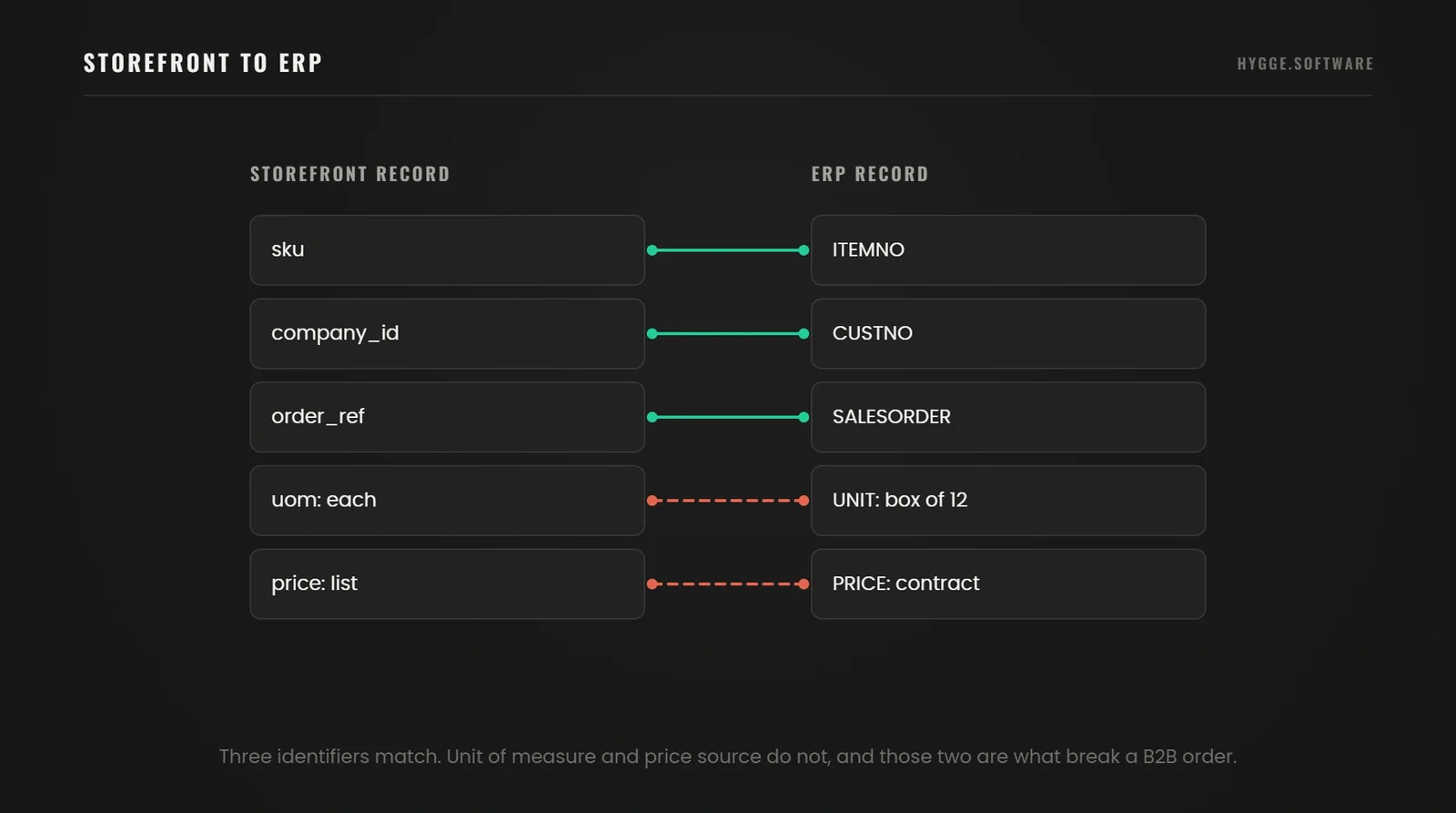
Connectivity means two systems can exchange a message. Coverage means the message carries the process you sell with. For B2B integrations, test contract prices per account, linked parent and child companies, multiple ship-to addresses, units of measure, partial shipments against one order, and returns against a specific shipment.
Run each as a transaction in a test environment. A feature listed in a comparison grid is a claim. An order arriving in the ERP with the right price, ship-to and tax treatment is evidence.
Use a Documented Integration as a Reference
The Shopify connector for Microsoft Dynamics 365 Business Central is a useful reference, because Microsoft publishes the entity list and the direction of each sync. Items, inventory levels, customers and B2B companies synchronise in both directions, with companies smart-mapped on tax or registration number. Sales orders import one way, carrying payment methods, purchase order numbers, returns and cancellations. Posted sales invoices and item tracking information export the other way.
Read that as a model for the questions to ask your own vendors. The value is in the shape: a named list of entities, a direction per entity, a documented mapping key. A vendor who cannot produce that list is asking you to buy a promise.
We start integration projects with an audit for the same reason. On BoardsOnline a founder had paid for a platform that status reports described as finished, and sorting what existed into three buckets was what made the remaining six months plannable. A feature grid is a claim. An audit is a list.
Source: Shopify connector overview, Microsoft Learn, read October 2026.
One item gets missed often: the platform's own release cycle. Shopify publishes a new API version each quarter and supports each stable version for at least twelve months, with nine months of overlap. Version 2027-01 is due on 1 January 2027. That cadence is a line in your support budget.
Check What Your ERP Exposes Today
Send the ERP name, version and hosting, plus the objects you need to move. You get a written answer on whether a packaged connector covers your B2B process and where it stops.
Decide What Must Sync Immediately and What Can Wait
The modes available are a live request at the moment of action, an update pushed when an event happens, and a transfer on a schedule. Pick per process. One speed for everything is too slow where it matters and too expensive everywhere else. The commercetools guidance follows the same split: inventory and pricing over live interface calls, product descriptions on a schedule.
Protect Pricing and Stock Checks at Checkout
Price and availability shown while browsing can be a cached copy. At order confirmation they should be checked against the owning system, because that is where you make a commitment you have to honour.
Decide now what the store does when the ERP does not answer. The options are to hold the order as a request pending confirmation and say so, to accept it against last known values within a stated tolerance, or to block confirmation. Each is defensible for a different business. Having no rule fails, because most storefronts default to accepting the order silently and leaving the mismatch for someone to find.
The commercetools material does not cover this failure case. Much of the published guidance on ecommerce ERP integration for b2b describes the working path and leaves the outage path to you.
Use Scheduled Updates Where Delays Are Acceptable
Product descriptions, images, category structures, tax codes and the customer master can move on a schedule, as can historical documents. Set the interval from measured volume: a catalogue with daily supplier updates needs a different cadence from one that changes twice a year, and a tighter interval shows up in request limits and overnight support load.
Delay, Consequence and Fallback by Object
Read each row as the cost of a stale value, the mode that fits, and what the store does when the owning system goes quiet.
Contract price at checkout
A stale value invoices a buyer at a price they never agreed. Use a live check, and on failure hold the order and say so on screen.
Available stock at checkout
A stale value oversells. Use a live reservation call, and on failure fall back to the last known figure with a safety margin.
Stock shown while browsing
Minutes of drift cost nothing and save traffic. Use batched event updates. If the feed stops, show a band such as in stock or low.
Order to the ERP
Minutes are invisible to the buyer. Push on the event with retries. If the ERP is down, queue the order and alert an owner.
Shipment and tracking to the store
Minutes are fine. Push on the event. If delivery fails, the next reconciliation picks it up.
Product descriptions and media
Hours are fine. Move on a schedule. If a run fails, the store keeps the previous version.
Why different data needs different refresh speeds
The cost of a stale value is set by the decision it feeds. A product description four hours old changes nothing. A stock figure four hours old sells goods you do not have. Rate every object by what goes wrong when it is out of date, and the refresh plan writes itself. Live synchronisation for descriptions buys nothing. Skipping it for prices buys a credit note.
A Cached Grid, a Live Basket, a Reservation at Confirmation
Hygge sets refresh speed per screen, measured against real category traffic.
 Zinaida Shelomkova
Head of Delivery
"We had a storefront calling the ERP for a live stock figure on every product tile, and category pages slowed until buyers stopped browsing. The fix was boring: a cached figure on the grid, a live check at the basket, a reservation at confirmation."
Implement the Integration in Five Controlled Steps
This is the sequence we run. Each stage ends in something a non-technical stakeholder can inspect, because integration work goes wrong quietly and a stage without a visible result is a stage nobody can sign off.
Audit systems and agree on the first release
Record every system in scope with its version, hosting and owner. Measure peak hour, never the daily average, because interface limits and timeouts are breached at the peak and the average hides it. Pick one complete process that can be followed end to end, usually a standard order on contract terms. Output: a one-page scope with a named owner per system.
Clean and map the data
Reconcile identifiers, merge duplicate company records, settle units of measure, align currencies and rounding, list mandatory fields on each side. Count the duplicate company records at estimate time: that one number predicts overrun on this stage better than catalogue size does. Agree with your finance leads how tax values are calculated and which system calculates them per market. Output: a field map plus a cleaned extract both sides accept.
Build and validate one complete order flow
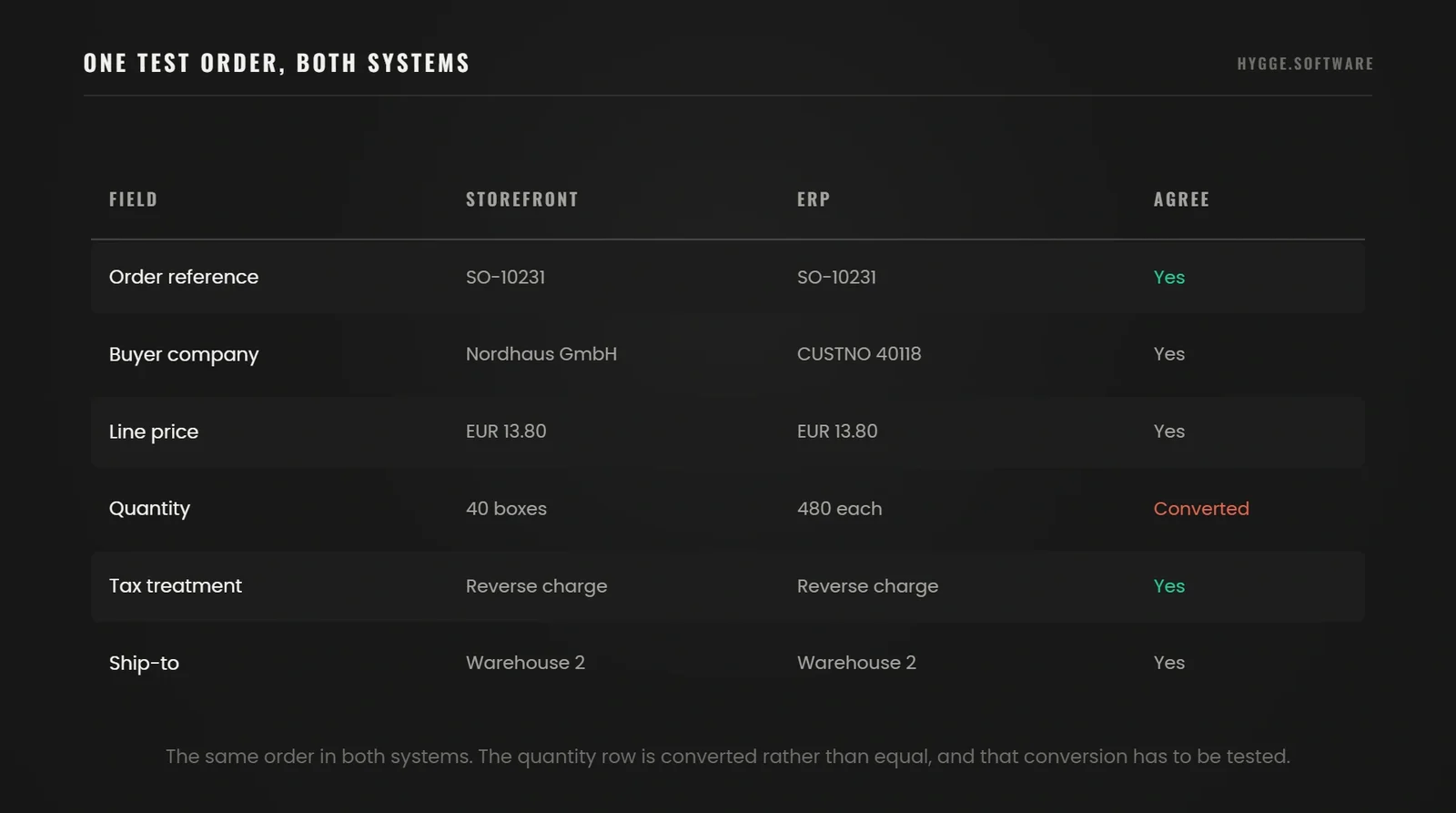
Move a single order to the ERP, have it accepted, and show the returned number and status in the buyer's account. Inspect the documents the ERP created: a sales order with the wrong tax code is a delivered message and a broken process. Output: one order traceable across four identifiers.
Test exceptions and launch with a pilot group
Open the flow to a few accounts or one product group. Work through the failure list before widening, and write the stop condition as a number before the pilot starts, such as any order reaching the ERP with a price the buyer did not see. A stop condition agreed during an incident is a negotiation. Output: a signed exception log and a go or stop decision.
Assign support ownership and expand gradually
Name who responds to a failed transfer, who approves a mapping change, and who re-tests after a platform or ERP update. Widen scope once the previous stage meets its criteria. Output: a support rota and a staged plan.
How Hygge Runs an ERP and Storefront Integration
These rules shape every integration we take.
An audit before a number. Two to three weeks on the systems, ending in a measured baseline and a priced scope. We ask for a data extract before quoting. The gap between what a client believes they hold and what the extract shows is the largest single source of overrun on this work.
Handover inside the build. The capability stays with the client’s team, which is how we run delivery and quality work as well.
Hygge has been shipping production software for US and European companies for seven years, under ISO 27001 and ISO 9001:2015 certified delivery.
Our Delivery Record
Numbers published on hygge.software and in the case studies linked above.
Test Failure Scenarios Before Going Live
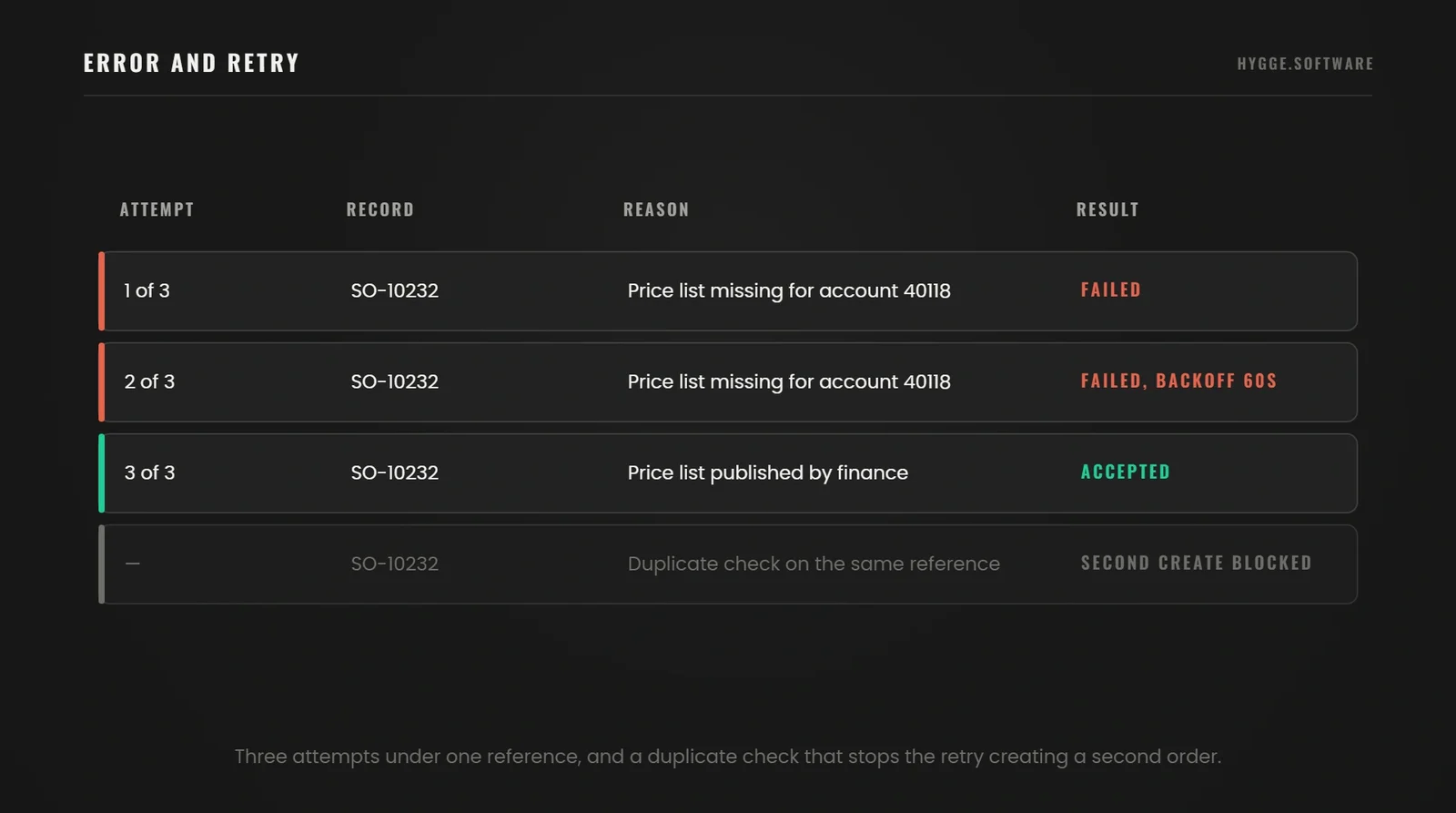
A successful order is one acceptance test. The rest of the suite covers what the systems do when something goes wrong, which is what happens for the remaining years of the integration's life.
Prevent Duplicate, Missing and Out-of-Order Updates
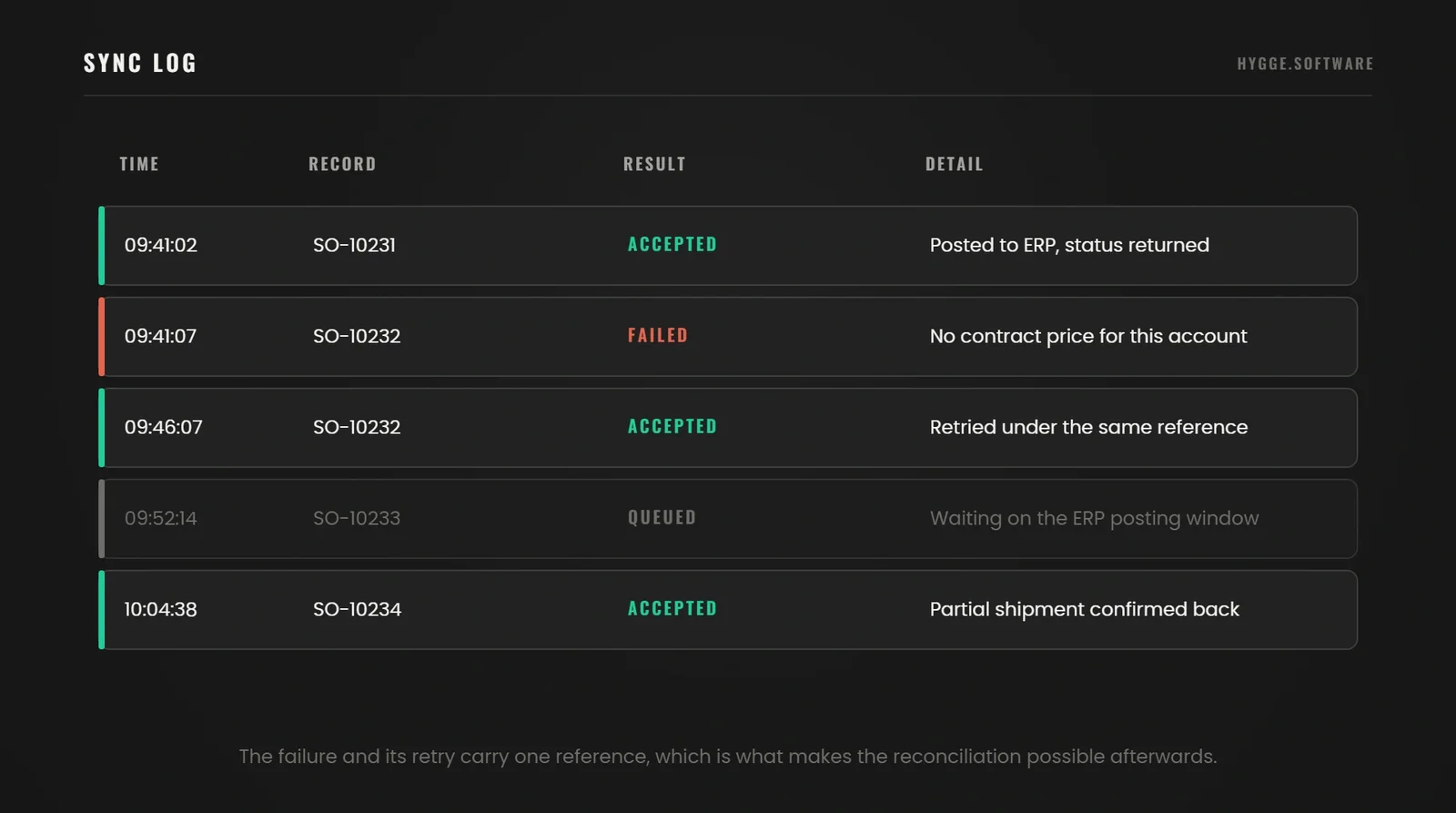
Most incidents come from three failure modes. A message is sent twice, because the sender retried after a timeout and the receiver had already processed it. A message is never delivered, because a notification was dropped and nothing noticed. Messages arrive out of sequence, so a shipped status lands before the accepted status it depends on.
We send an idempotency key on every message and have the receiver store the keys it has already handled, so a repeat is logged and dropped. We treat duplicates as the normal case, because event delivery guarantees at-least-once and never exactly-once. We size the key store to cover the longest retry window in the chain, since a shorter one lets the dedupe expire before the retry lands.
Against loss we run a scheduled reconciliation that compares both sides over a window and reports the gaps. We set that window longer than the worst delay anywhere in the chain, because a shorter one reports healthy records as missing and trains people to ignore the report. It is the only mechanism that catches a notification nobody knew was missing.
Against sequence problems we carry a version or a source timestamp on every update, and the receiver refuses to apply an older state over a newer one.
Check Partial Shipments, Returns and Access Permissions
Work through a partial shipment, a cancellation after the ERP has allocated stock, a return against one line of a multi-line order, and document visibility where a contact at one company location must never see another location's invoices. Agree the expected behaviour for each before launch and record it. These are the cases where two reasonable people assume opposite outcomes.
Checks and What Each One Must Confirm
Run these on a test order. Each line states the behaviour both systems have to agree on.
Send the same order twice
One order exists in the ERP. The second message is logged as a duplicate and ignored.
Drop a status notification
The scheduled reconciliation reports the gap within its window and the status corrects itself.
Deliver statuses out of sequence
The older status is rejected. A shipment never reverts to accepted in the buyer's account.
Take the ERP offline at checkout
The agreed rule runs, the buyer sees the agreed message, and an owner is alerted.
Ship half an order line
Both systems show the same shipped and outstanding quantities, and the invoice covers the shipped quantity.
Return one line of a multi-line order
The credit note references the original line, and stock returns once the warehouse confirms receipt.
Use a contact from another company location
The request is refused on the server and logged, and no document is exposed.
Exceed a credit limit mid-order
The order is held with a reason the buyer can read, and a named role is notified.
Estimate the Cost and Measure the Business Result
Cost follows the number of systems, the number of non-standard processes and the state of the data, in that order. Published budgets mean little without those inputs, so treat any figure you see, ours included, as conditional until someone has read your field map.
Separate Implementation Costs from Ongoing Costs
One-time work covers discovery and the system audit, data cleaning, configuration or development, test setup, acceptance testing and the pilot. Recurring cost covers licences, infrastructure, monitoring, the support rota and the re-test cycle forced by vendor releases.
The factors below move the number most.
The count of systems, because effort grows with the pairs that have to agree: three systems is three links, five systems is ten, and each link carries its own mapping, its own tests and its own re-test on every vendor release.
The count of processes the packaged tooling does not model, since each one is custom work plus its own tests plus a permanent line in the support rota.
The availability requirement, because an integration permitted to queue for an hour needs a queue and a retry. One that may never be unavailable needs a second path, health checks, failover and a rehearsal that proves the failover works, and that is a different project.
Which brand of ERP you own matters less than that list. The systems that integrate most easily have documented interfaces, a test environment and a predictable release cycle, and those are properties of the deployment.
Track Order Accuracy, Processing Time and Manual Work
Record the starting values before anything changes, or you will have no way to show what the project did.
Measure the share of orders the ERP accepts with no human touch, elapsed time from placement to acceptance, duplicate records created per month, the age of the oldest unresolved error, and hours per week spent reconciling the two systems. Each is countable from the systems themselves. A measure that depends on someone remembering to log something stops being collected by week six.
Get the Flows Priced
Send a data extract and the list of flows. You get the split between one-time build and the monthly line, with the assumptions written beside each number.
The Data Is Where Estimates Go Wrong
Hygge asks for a data extract before putting a number on an integration project.
 Artem Petrov
CFO & Co-Founder
"Estimates on integration projects go wrong in the same place every time: the data. A client says they have 4,000 products and 300 customers, and both numbers are right. What nobody mentions is that 300 customers are held as 420 records, because the sales team created duplicates for years. We ask for a data extract, and the quote is built from it."
Pricing Rules Decide Whether You Build or Buy
Hygge treats the connector decision as a question about your pricing rules.
 Alina Sukhova
CEO & Co-Founder
"The choice between a packaged connector and custom work is a commercial decision wearing technical clothes. If your pricing rules are what makes your business hard to copy, build around them. If they are an accident of how the sales team has always worked, change the rules and buy the connector."
Figures in This Article
Sourced from McKinsey and from Shopify platform documentation, both read in 2026.
B2B Ecommerce ERP Integration FAQ
The questions distributors ask about ERP and ecommerce integration at the mapping stage.
 Can I integrate a legacy ERP that has no modern API?
Do I need to replace my ERP before launching B2B ecommerce?
Can one ERP support both B2B and B2C online stores?
Which are the best ERP systems for ecommerce integration?
Is ERP integration the same as EDI integration?
Should I import all historical orders into the new store?
Do I need a separate B2B customer portal?
Scope Your ERP and Storefront Integration
Send us the system names and versions, the list of flows you need and one example of a complicated order. We will come back with what a packaged connector would cover and where custom work starts.

Describe the Defect
What the camera must catch, at what line speed, and what it costs today.

Get a Feasibility Review
Camera, lighting and method, checked against the defect size and the cycle time.
Receive a Scoped Plan
Data plan, integration, timeline and a cost per station with a payback estimate.