


How POS Integration Connects Your Retail Operations
What each system needs from one store sale, how the link is built, and what breaks after launch.
 Yevhenii Sukhov·Publication date·13 min read
A till in your Manchester store sells the last medium jacket at 14:12. At 14:40 the website still offers it, the warehouse still counts it, and the accounting system has no record of the sale. Nothing is broken; the systems were never connected. In the Unified Commerce Benchmark published on 23 March 2026, Incisiv assessed more than 400 specialty retailers across 330 capabilities. It found 7 per cent qualified as unified commerce leaders and 33 per cent sat in the basic tier, with leaders growing at close to twice the rate. This article covers how the links between a till and the rest of the business get built, and what to check when you commission one.
What Is POS Integration?
POS integration is the connection of a point of sale system to other business applications so that agreed data moves between them automatically. The data usually covers sales transactions, products, stock levels, payment status and customer records. The point of sale stops being a sealed cash register and becomes one more system that publishes what it knows.
In practice the POS integration meaning goes further. It is a set of decisions about which system owns each number and how quickly each one has to travel. It also covers what happens when one end does not answer.
POS Integration vs. an Integrated POS System
POS system integration is work you commission: connecting the till you run to the systems you run. An integrated POS system is a product you buy, where the vendor has already joined the till, the stock module and the reporting under one roof.
That packaged product removes some of the work. It rarely removes all of it. Count the systems in your own estate that sit outside the vendor's walls. Most retailers reach four or five. Typical ones are the accounting package, the loyalty platform, each marketplace channel and the warehouse system. Add the e-invoicing provider in every country they trade in. Each one is a boundary you own, and the work continues there. The Incisiv benchmark shows how rare full coverage is. It assessed 330 capabilities across shopping, checkout, fulfilment and service, and found 7 per cent of 400-plus retailers at leader level. In our experience, buying a suite does not deliver that coverage on its own. Judge the product by which of your systems sit inside it, never by the word on the box.
POS Integration vs. Payment Terminal Integration
Connecting a till to a card terminal is a narrower job than connecting a till to your business. The terminal link moves one transaction through one payment flow. It does not update stock, it does not reach the online store, and it does not post to the ledger.
Adyen documents two models for that link. In a local integration the point of sale talks to the terminal over the local network; the other is a cloud integration. Both use the same Terminal API and JSON messages. The terminals are certified for card data, which keeps that data off your point of sale entirely. Useful, and separate from the question this article covers.
Source: Adyen point-of-sale documentation, read October 2026.
How Does POS Integration Work?
A system records an event, the integration carries it under agreed rules, the receiving system processes it, and somebody checks the result. Every working integration is those four steps repeated. Most failures are the fourth step missing.
From a Store Sale to Updated Business Records
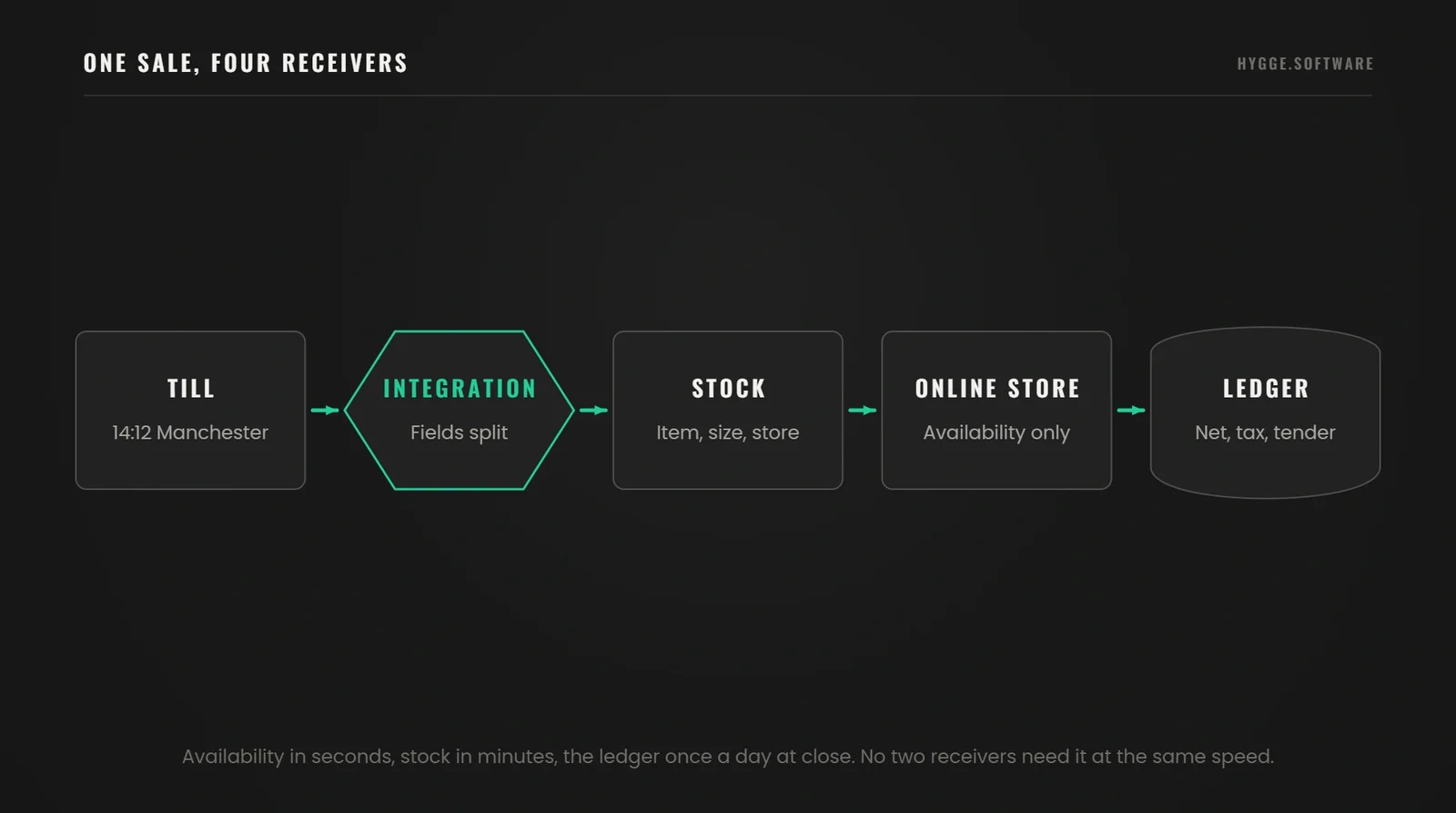
A clothing retailer sells one jacket, size M, in a Manchester store. The till records a transaction: store, item, size, price paid, discount, tender type, time.
Each receiving system wants a different part of that one event, and naming the fields is most of the design. The warehouse system needs item, size and store code, to decrement the count at that location. The online store needs one number, the resulting availability figure for that SKU, so it stops offering stock that has gone. The accounting system needs net value, tax amount, tender type and trading date, to post the day. The customer system needs the purchase line and a loyalty identifier. It needs them only where the shopper was identified at the till, which in most stores is a minority of transactions. We run three clocks across those paths: availability in seconds, because it is the number a customer sees; stock in minutes; the ledger once per day at close. If the online store cannot hold a figure per location, that gap belongs to ecommerce platform development and has to be closed before the till link.
None of these receivers needs the whole record, and no two need it at the same speed.
Settle Who May Change the Stock Number
Hygge settles data ownership at the design stage.
Yevhenii SukhovCTO & Co-Founder
"The question we ask first is never which connector. It is which system is allowed to change the stock number. Once a client answers that out loud, half the integration design writes itself, and the arguments that would have surfaced in week nine surface in week one."
APIs, Webhooks and Scheduled Synchronisation
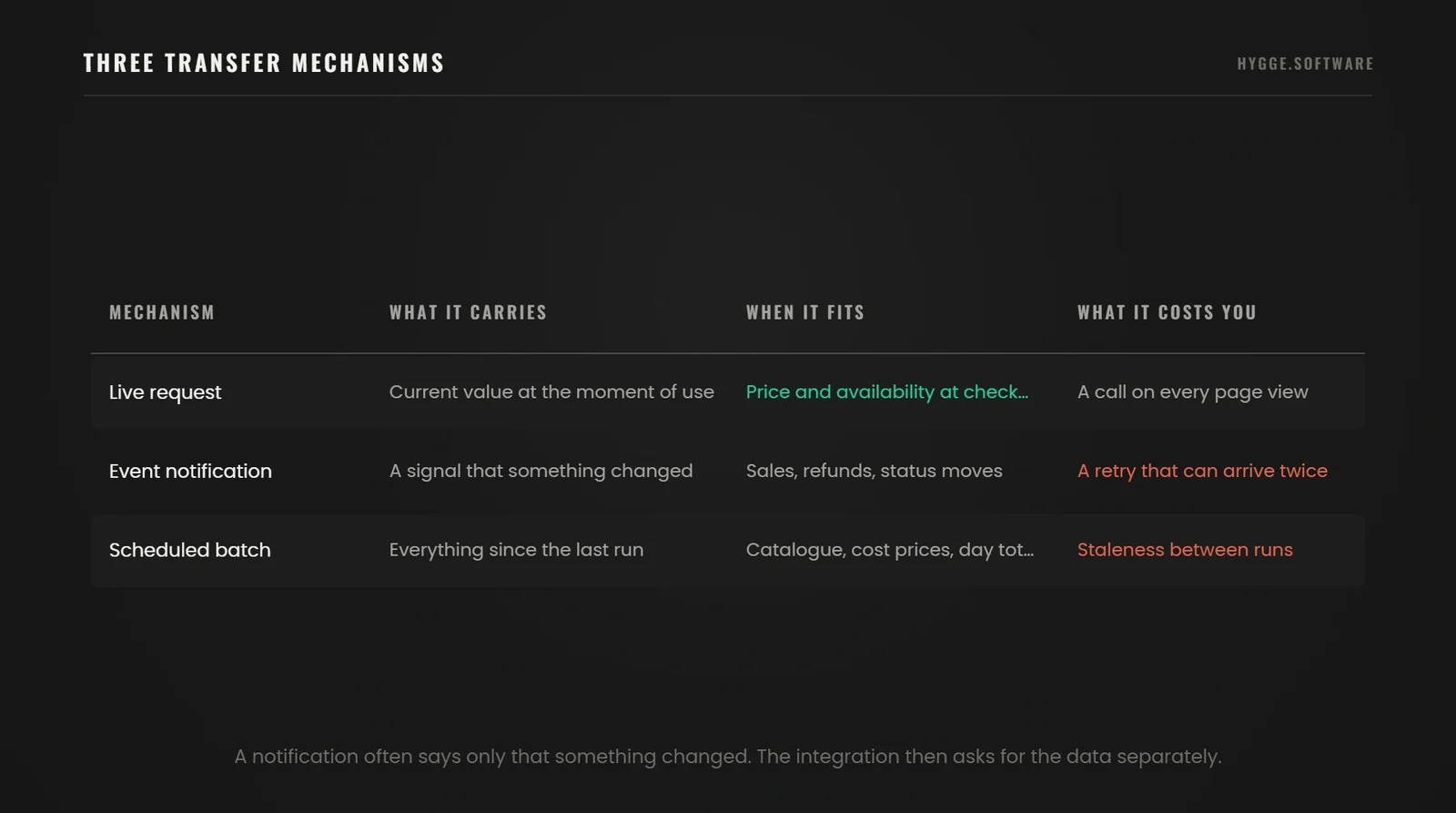
The traffic moves by request, by notification or on a schedule. A request asks a programming interface for current data at the moment it is needed. A notification goes out when something changes. A scheduled transfer moves a batch on a timer.
A detail that trips teams up when you scope POS integrations: a webhook often reports only that something changed, with an identifier and little else. The integration then has to call back and ask for the record. If you size your traffic on webhook volume alone, you will undercount by the number of follow-up calls.
Platform capabilities set some of this for you. Shopify documents that point of sale UI extensions running only on the device can query the Admin interface directly. Extension-only apps cannot call third-party services or hold secrets. Anything reaching an external system needs a server behind it. That is an architecture decision made by the platform, and it belongs in your estimate.
Source: Shopify POS app documentation, read October 2026.
Which Systems Can You Connect to a POS?
The list below covers what most retailers join first. For each system: the data it exchanges, the direction, the practical result and the limitation to confirm first.
Online store
Carries products, prices, stock availability and online orders for collection or return in store. Moves both ways. Gives one stock figure and in-store returns for web purchases. Check how the store platform models locations, because a single stock pool will not support collection in store.
Warehouse or inventory system
Carries stock movements, transfers, counts and adjustments. Moves mostly into the warehouse system and back as availability. Gives stock numbers that survive a stocktake. Check whether the till can report a sale against a specific location, since a company-wide pool will not do.
Enterprise resource planning
Carries products, prices, sales summaries, costs and purchase orders. Moves both ways. Gives one product master and a closed loop from sale to replenishment. Check whether the system accepts summarised daily postings or demands transaction-level detail.
Accounting
Carries daily takings by tender, tax, discounts and refunds. Moves one way out of the till. Gives a reconciliation that takes minutes. Check how tax codes map, since the till and the ledger rarely use the same names.
Customer records and loyalty
Carries identified purchases, points earned and redeemed, and consent status. Moves both ways. Gives one view of a shopper across store and web. Check what share of store transactions are identified at the till, because an unidentified sale carries no customer at all.
Payment service
Carries authorisations, settlements, refunds and chargebacks. Moves mostly inward. Gives takings that match the bank. Check that settlement references reach the ledger, otherwise reconciliation stays manual.
What Changes When Your POS Systems Are Connected?
The changes below depend on clean data, coverage of the cases you run, and a delay the business can live with.
Staff stop typing the same transaction twice. Measure hours per week spent re-entering store sales, counted before and after.
Stock figures agree across channels. Measure oversell incidents per month, and the gap between the till figure and the stocktake.
Customer history covers both channels for identified shoppers. Measure the share of store transactions attached to a customer record, which also tells you how much history you are still missing.
Daily reconciliation becomes a check, no longer an investigation. Measure the time from close of trade to a reconciled day, and the unexplained differences left open.
Those numbers are the argument for the project. Retail software development work that cannot name them before it starts is a project without an acceptance test.
Native Connector, Integration Platform or Custom Development?
A native connector is built by one vendor for the other. An integration platform sits in the middle and speaks to several systems. Custom development writes the link for your processes. All three can use the same interfaces underneath. The choice is about coverage, maintenance and who fixes it when a vendor changes something.
A native connector is cheapest when your processes match what it models. It becomes the most expensive option the moment they do not, because people with spreadsheets fill the gaps. An integration platform earns its licence from the third system onwards. It gives one place to retry a failed message and one place to see what moved. The arithmetic is why: 3 systems make 3 point-to-point links, 5 systems make 10, and every link carries its own mapping, tests and re-test. Custom work fits a process the market does not model, a system with no supported interface, or a rule that is the reason your margin exists. Price all three routes against the same two lines: the build, and the re-test each vendor release forces on you every year. To discuss your system integration requirements, bring the list of systems and the processes a connector has to carry.
Where a Packaged Connector Runs Out
Hygge stops evaluating packaged connectors once two of four limits appear.
 Alina Sukhova
CEO & Co-Founder
"The signs that a packaged connector will not carry you are boring and easy to list: fields it has no home for, refunds that do not follow the standard path, more than one legal entity, and anything it can read but cannot write back. If a client hits two of those four, we stop evaluating connectors."
Start From the Systems You Already Run
Send the till brand, the store count and the systems behind them. You get a written view of what a packaged connector covers and where custom work starts.
How to Plan and Validate a POS Integration
What follows is the shape of the conversation to have with whoever builds this, in the order the questions have to be answered.
Define Workflows, Data Ownership and Compatibility
List the operations the integration has to support. Then list the systems involved with their versions and the interfaces each exposes. Check whether your service account can read and write each object. For every data type, name the system that owns it and the directions a change may travel.
Objects, Owners, Timing and Proof
Fill this in for your own operation, then take it to a quote.
Product
Owned by the enterprise system or product catalogue, received by the till. Sent on create and on change, with hours of delay acceptable. Proved by comparing counts and a sample of fields on a schedule.
Stock level
Owned by the warehouse system, received by the till and the online store. Sent on movement. The online store gets availability within seconds, and location counts follow within minutes. Proved by a stocktake and by the oversell count.
Sale
Owned by the till, received by accounting, the warehouse and customer records. Sent at the close of the transaction; accounting takes a daily summary at close. Proved by the day's takings matching the ledger posting.
Refund
Started at the till or online, confirmed by the system that holds the original sale. Sent on completion, with minutes acceptable. Proved by the credit referencing the original transaction and by stock returning to the right location.
Map Products, Locations, Prices and Tax Fields
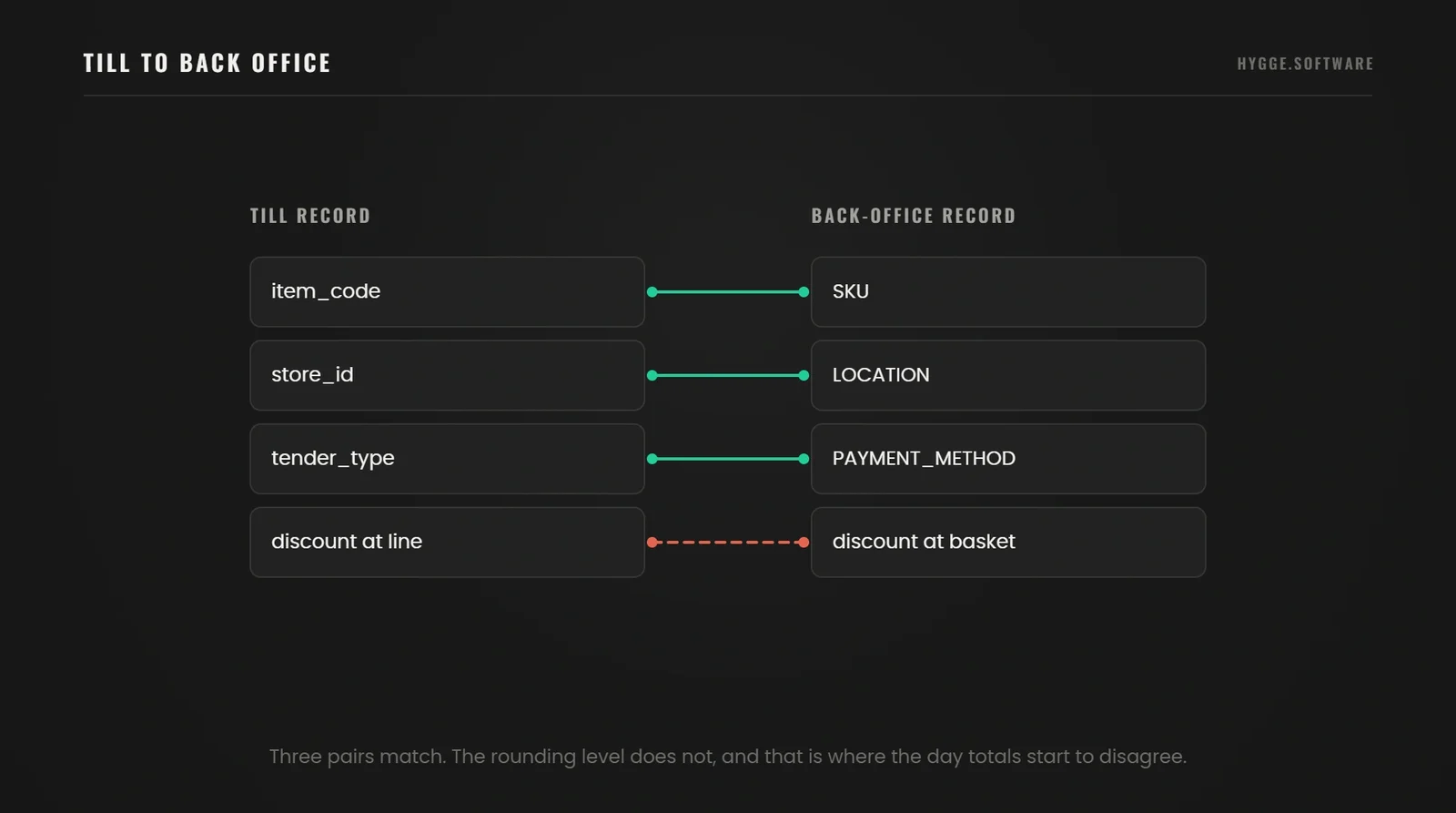
Match items, variants, stores, discounts, currencies and tax fields across systems. The failure here is quiet. An item exists under two codes, or a store is one location to the till and three to the warehouse. A rounding rule may apply at line level in one system and at basket level in the other.
Check rounding and the way each system represents a price, including whether it carries tax inclusive or exclusive. Confirm the tax rules for the country you trade in with the people responsible for them. A mapping error that survives launch becomes a reconciliation task that runs forever. That is why inventory management software development work starts with the identifiers, long before the screens.
Settle the Mapping, Then Take It to a Quote
Items, variants, stores, discounts, currencies and tax fields across every system you run. We map them and name the ones that will fight each other.
Test Sales, Refunds and Failure Recovery
A normal sale is the first test and never the suite. We run these cases at the test stage, with the expected result written down for each:
- A normal sale, then a partial refund against one line of a multi-line receipt.
- A full refund after the day has been posted and the ledger closed.
- The same sale delivered twice under one transaction id.
- A sale taken during a price change.
- One receiver unavailable while the others keep trading.
- The catch-up once that receiver returns.
- An end-of-day total that disagrees by a single penny.
The duplicate is the case that exposes architecture. A connection reporting success while creating two sales has passed a connectivity test and failed an acceptance test. The fix belongs on the message as an idempotency key, since a nightly script hunting for pairs finds the damage once it is already done.
Pilot the Integration and Assign Ongoing Ownership
Run one store, or one product group, against agreed success criteria, and reconcile the totals daily. Have a rollback plan, monitoring that alerts a named person, and a decision point with the conditions written down.
If you run the old and new exchange side by side, make sure only one performs real operations. Two live paths posting the same sale is the most common way a parallel run damages the data it was meant to protect.
How Hygge Runs a POS Integration
These rules shape every till project we take, and the sequence is what stops the estate drifting.
An audit before a number. Two weeks on the till estate, the systems behind it and the state of the product data, ending in a measured baseline and a priced scope. We ask for a product export and a week of transactions before quoting. The count of duplicate item codes predicts the effort better than the store count does.
The money paths first. Sale, refund and end-of-day reconciliation get built and tested before anything optional. Those three decide whether the finance team ever trusts the system.
One store under real trading. The pilot runs a full trading week, including the busiest hour, with totals reconciled daily. The stop condition is written as a number before it opens.
Handover inside the build. The field map documented, a named owner for the exception queue, and a re-test trigger tied to each vendor release.
Our published projects show what those rules protect against. On the PlayFusionLabs CRM we moved sales, projects and finance into one database in roughly two months and removed the reconciliation between separate tools entirely. A till estate follows the same arithmetic: reconciliation effort follows the count of systems that believe they own the same number. On BoardsOnline a founder had paid for a platform that status reports described as finished. Sorting what existed into three buckets made the following six months plannable. We open till integrations the same way, because a connector's feature grid is a claim and an audit is a list.
Our Delivery Record
Numbers published on hygge.software and in the case studies linked above.
When a Pilot Is Ready to Widen
Hygge widens a store pilot on evidence, never on a date.
 Zinaida Shelomkova
Head of Delivery
"We widen a pilot on three signals: the daily reconciliation comes out clean without anyone touching it, the exception queue stops growing, and the store staff have stopped keeping their own parallel notes. The third one tells you more than the first two."
Common POS Integration Problems and How to Prevent Them
Each of these appears after launch, which is why it belongs on a dashboard.
Stale stock figures
Usually a failed scheduled run or a webhook nobody retried. Prevent it with a reconciliation pass that compares both sides over a window. Watch the age of the newest stock update per store.
Duplicate sales
Usually a retry after a timeout where the receiver had already processed the message. Each transaction carries a unique ID from the till, and the receiver remembers the IDs it has processed and gives the same answer to a repeat. Most webhook services deliver at least once, so plan for duplicates. Watch the count of duplicate references rejected per day.
Lost refunds
Usually a refund path that was never mapped, so it fails silently. Prevent it by testing refunds as their own acceptance case. Watch refunds recorded at the till against credits posted in the ledger.
Unmatched items
Usually a product created at the till that has no counterpart in the back office. Prevent it by deciding which system may create a product and blocking the other. Watch the queue of unmatched item codes.
Expired access
Usually a token or certificate that lapsed without a reminder. Prevent it by recording every expiry date with an owner. Watch authentication failures, which go from zero to everything in one step.
What Should Retailers Check About Security and Customer Data?
Give every connection the narrowest permissions that let it do its job. A service account that posts sales has no business deleting products.
Keep secrets out of configuration files and off store devices, and record where each one lives and when it expires. Log every transfer with enough detail to answer what moved and when, without writing personal data into the log.
Separate card data from payment references. The certified terminal handles the card; your systems carry an identifier and a status. Keeping that boundary intact keeps your integration code out of card-data scope. The card-security (PCI DSS) checks then cover mainly the terminals. The same boundary shapes the API and payment integration. Settlement references travel to the ledger, and card data stays with the terminal.
Settle in writing who owns each part after launch: the till vendor, the platform, your team, your partner. Retailers find the gaps in that list during an incident, which is the worst moment for it.
What Determines POS Integration Cost and Timeline?
The main drivers are the count of systems, the quality of the interfaces they expose and the state of the data. Then come the processes that fall outside the standard model, any history that has to migrate, and the depth of testing. Licences and support sit on top as a recurring line.
Separate the one-time build from the running cost. The build is discovery, mapping, configuration or development, testing and the pilot. The running cost is licences, infrastructure, monitoring and the people who clear the exception queue. It also includes the re-test forced every time a vendor ships a new interface version.
We publish no universal price for this work. A figure without your system list and a look at your data is a guess with a currency symbol in front of it. To plan your POS system integration, start from the system list and an export of the product data.
Plan the Rollout Across Your Estate
Send the till brands, the store count and the operations that break today. You get a staged plan with the pilot store, the stop condition and a cost split.
What Moves a POS Estimate
Hygge asks for two exports before putting a number on a point of sale project.
 Artem Petrov
CFO & Co-Founder
"Two inputs move a point of sale estimate more than anything else: how many stores deviate from the standard process, and whether anybody has looked at the product data in the last year. We ask for an export of both, and the quote states what it assumed."
Figures in This Article
From the Incisiv Unified Commerce Benchmark published in March 2026.
Scope Your POS Integration
Send us the list of systems, the number of stores and the operations that break today. We will come back with what a packaged connector would cover and where custom work starts.
List Your Systems and Stores
The POS, ERP, ecommerce and warehouse systems, the number of stores and the operations that break today.

Get a Connector Review
Hygge checks what a packaged connector covers and where custom integration work starts.
Receive a Scoped Plan
Data flows, the integration approach, a rollout timeline and a price for the first stores.
POS Integration FAQ
The questions retailers ask at the mapping stage.